Fostering Learning in Training

As part of my ED 601 course on Instructional Design and Development, I have been using the ADDIE Model to develop a training session for the teachers at my school. I am currently in the Design phase of this process, which includes determining the strategies I might use in the training. For this reflection, I am focusing on two strategies: assessing prior knowledge and incorporating multimedia instruction. In this post, I will discuss how these strategies foster learning and provide guidelines for using them. I will also share examples of each strategy.

Assessing Prior Knowledge: Pre-Assessment

According to Brown and Green (2024), identifying prior knowledge of a topic or skill is a critical component of understanding learners and designing effective instruction. Prior knowledge can be identified in several ways, including pre-assessments, concept maps, K-W-L charts, probing questions, and formative assessments. Since my training session focuses on using the basic features of a Chromebook and troubleshooting common issues, I believe a short pre-assessment will help me determine how familiar teachers are with these features. This pre-assessment can be administered electronically before the training session.

Note. From Using Pre-assessment data to design more effectively [Video], by Caitlin Tucker, 4 March 2024, YouTube (https://www.youtube.com/watch?v=LvaTgjHF50E)

Pre-assessments benefit both instructors and learners. Studies have shown that pre-assessing not only provides feedback to instructors about learners’ understanding but also serves as a “metacognitive ‘reality check’—highlighting the gaps in one’s knowledge and facilitating a search for relevant information during subsequent study” (Pan et al., 2020, p. 544). Guskey and McTighe (2016) outline six benefits of using pre-assessment as part of instruction:

  • Identifying learners’ prior knowledge and skills
  • Monitoring student progress by providing baseline data
  • Communicating expectations about what will be learned
  • Focusing learners’ attention on learning targets rather than the activities they will engage in
  • Checking for preconceived ideas or misunderstandings so they can be addressed directly during instruction
  • Identifying learners’ interests, talents, and preferred ways of learning

Guskey and McTighe (2016) also provide three guidelines for the effective use of pre-assessments. First, it is important to clarify the purposes of pre-assessment. From a design perspective, determine why you are pre-assessing, what data you intend to uncover, and how you will collect the information. It is also crucial to communicate to learners that the pre-assessment is intended to help address their needs and will not be used for grading purposes. Second, use the pre-assessment data to take action: review skills or knowledge that may be lacking, address misconceptions, provide targeted instruction, or differentiate instruction. Finally, be careful not to overuse pre-assessments. They are most useful when they provide information you do not already have or cannot anticipate in advance. When used, pre-assessments should be brief, easy to administer, and easy to interpret.

Here is an example of a pre- and post-assessment I used when I taught algebra: Unit 7 “I Can…” Statements. I found this was a low-stress and easy way for my students to let me know what they felt like they knew or did not know. My students appreciated the check lists because the lists helped them identify areas they needed to focus on when preparing for their summative assessments.

Multimedia Instruction

Multimedia instruction focuses on lessons that incorporate “words (such as spoken or printed text) and pictures (such as illustrations, graphs, maps, photos, animations, or videos)” (Mayer, 2008, p. 760). According to Brown and Green (2024), the visual display of information plays an important part in effectively communicating information so that it is easy for learners to understand and process. It follows then that instructional designers need to know basic visual design principles as well as principles for designing effective multimedia instruction. Even if some work is completed by a commercial artist, the instructional designer must ensure that the final project helps the learner understand the content.

Through his research, Mayer (2012) developed twelve principles for designing effective multimedia instruction. These principles are based on three assumptions about learners: (1) they use two distinct channels for processing visual and auditory information, (2) they have a limited capacity for processing information, and (3) they must be actively engaged in the learning process. The twelve principles are categorized into three areas: reducing extraneous processing, managing essential processing, and fostering generative processing. The graphic below illustrates these three areas and the twelve principles.
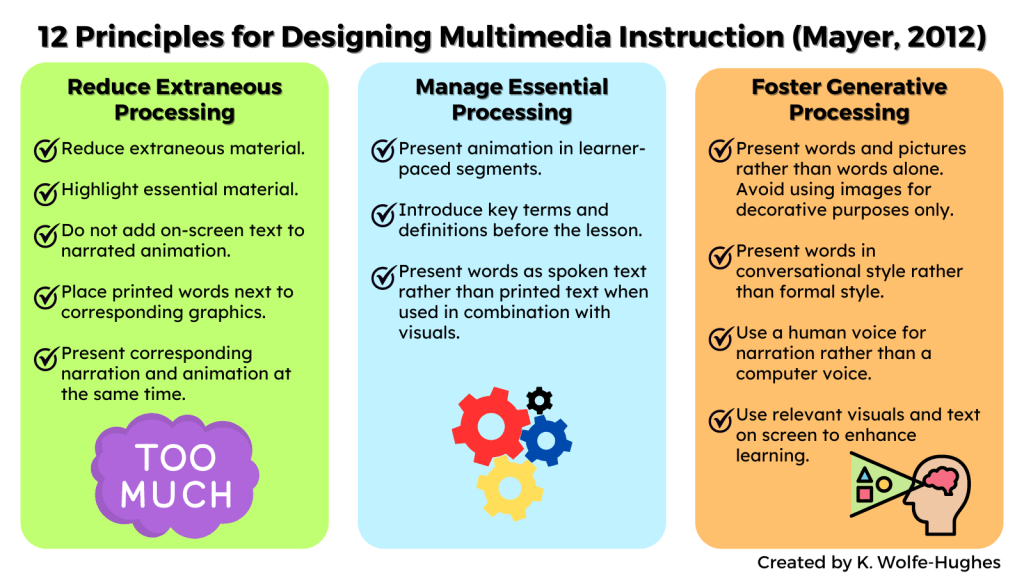
The Digital Learning Institute (2024) has a blog post that provides more specific information about the twelve principles for designing multimedia instruction, along with examples of each principle. Some of these principles overlap with basic visual design principles. I have encountered some of these principles when completing online training modules. In particular, I find the segmenting principle beneficial as a learner. Rather than being presented with a continuous stream of information, I have an easier time processing and understanding the material when it is broken into more manageable pieces. I also feel that I have more agency when I can control when I am ready to move on to the next piece of information.

Final Thoughts

When considering the Design phase of the ADDIE model, I have gained a deeper appreciation for the importance of keeping the learner in mind. This involves using information about learners’ prior knowledge and preconceived ideas to design instruction that meets their specific needs, which may vary from group to group. Equally important is considering how information is presented to learners. Most of the training I conduct with teachers involves technology, which requires demonstrating how to use it. To do this effectively, I combine visuals and words. Keeping Mayer’s twelve principles for multimedia instruction in mind will help me present information in a way that fosters learner engagement and facilitates efficient processing.

References

Brown, A. H., & Green, T. D. (2024). Essentials of instructional design: Connecting fundamental principles with process and practice (5th ed.). Routledge. 

Digital Learning Institute. (2024). Mayer’s 12 principles of multimedia learning. Retrieved July 22, 2024, from https://www.digitallearninginstitute.com/blog/mayers-principles-multimedia-learning 

Guskey, T. R., & McTighe, J. (2016). Pre-assessment: Promises and cautions. Educational Leadership, 73(7), 38–43. 

Mayer, R. E. (2008). Applying the science of learning: Evidence-based principles for the design of multimedia instruction. American Psychologist, 63(8), 760-769.

Mayer, R. E. (2012). Multimedia learning (2nd ed.). Cambridge University Press. 

Pan, S. C., Schmitt, A. G., Bjork, E. L., & Sana, F. (2020). Pretesting reduces mind wandering and enhances learning during online lectures. Journal of Applied Research in Memory and Cognition, 9(4), 542-554.  

Tucker, C. (2024, March 4). Using pre-assessment data to design more effectively [Video]. YouTube. https://www.youtube.com/watch?v=LvaTgjHF50E

E-Portfolios as a Useful Assessment Tool in Distance Learning

Simonson and Zvacek (2024) define assessment as “the process of measuring, documenting, and interpreting behaviors that demonstrate learning” (p. 242). Assessment serves as a crucial feedback mechanism for both students and teachers. For students, it offers insights into their progress toward meeting course objectives, enabling them to make necessary adjustments and take responsibility for their learning. For teachers, assessment feedback provides an understanding of the effectiveness of instruction and course activities in facilitating student mastery of objectives, allowing them to make informed adjustments as needed.

For assessments to be effective, they must exhibit alignment, validity, reliability, and practicality (Simonson & Zvacek, 2024). Alignment pertains to the extent to which the assessment corresponds with the course objectives, both conceptually (content) and cognitively (thinking skills). Validity refers to the extent to which an assessment accurately measures its intended constructs. Reliability denotes the consistency and stability of an assessment in measuring its intended outcomes. Practicality involves considering factors such as the time required for students to complete the assessment, the resources needed, the time needed for scoring, and the usefulness of the information obtained from the assessment.

Portfolios as an Assessment Tool

Electronic portfolios (e-portfolios) can be utilized for both formative and summative assessments (Allman et al., 2021; Simonson & Zvacek, 2024). The type of assessment is determined by the tasks incorporated within the e-portfolio. Activities focusing on critical thinking, self-assessment, and self-reflection are formative, as they enable learners to gain deeper insights into their learning journey and connect theory with practice (Song, 2021). For summative assessment, specific activities must explicitly link the learner’s skills, knowledge, and accomplishments to the course’s desired learning outcomes (Song, 2021). When the task in the e-portfolio is used for summative assessment, the rubric and score should not be documented within the e-portfolio, especially in cases where the e-portfolio is shared publicly with others (Chang & Kabilan, 2024). In cases like this, it is better to communicate the score and rubric with feedback directly to the student through the course management system.

Chang and Kabilan (2024) contend that electronic portfolios (e-portfolios) offer a more authentic method for evaluating student learning and program success for administrators. Additionally, e-portfolios foster collaborative, reflective, and integrative learning (Chang & Kabilan, 2024; Song, 2021). Students exercise ownership over their learning by selecting artifacts and utilizing various modes of expression, including oral, video, visual, and written formats (Chang & Kabilan, 2024; Simonson & Zvacek, 2024). Moreover, students generally hold favorable attitudes towards e-portfolios for both assessment and learning, which is likely due to the connections they make between course content and their career aspirations (Allman et al., 2021).

E-portfolios have the potential to be a useful tool for assessment when designed correctly. In general, e-portfolios exhibit high validity because they allow students to independently gather, select, and reflect on evidence of their learning for formative purposes (Lam, 2023). Care should be taken to prevent the contents of the e-portfolio from being too narrowly defined as this may decrease the validity since students end up simply providing content rather than engaging in reflective thinking (Lam, 2023). While it does appear that well-defined rubrics aligned to the desired learning outcomes of the course increase reliability, more research is needed to clarify the reliability of e-portfolios (Lam, 2021, 2023). Finally, the practicality of e-portfolios depends on the computer literacy of both the students and instructors to manage their e-portfolios.

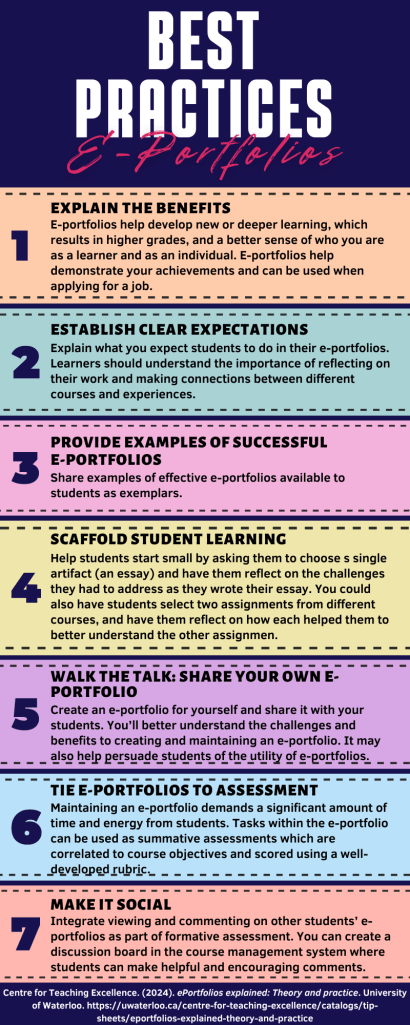
At the right are some best practices for instructors to consider when using e-portfolios with their students (University of Waterloo Centre for Teaching Excellence, 2024). In addition, the University of Waterloo provides an example of one of their student’s e-portfolios.

Digital Tools for e-Portfolios

Several digital tools support the creation of e-portfolios. These include  FolioSpaces (free), Blackboard ePortfolio, Digication ePortfolios, and Mahara. As mentioned above, students need to be aware of e-portfolio expectations before and during their engagement with their e-portfolios. In addition, to realize the full benefits of using e-portfolios, students need continuous support with the technological aspects of the e-portfolio system.

Note. From What is FolioSpaces? [Video], by FolioSpaces, 25 May 2016, YouTube (https://www.youtube.com/watch?v=cKeWzxBZAy4&t=5s)

Many course management systems have some type of e-portfolio system add-ons, such as the Blackboard ePortfolio. While these add-ons may be convenient for integrating the e-portfolio within the course management system, there are some drawbacks to consider (Chang & Kabilan, 2024). First, once students graduate and are no longer associated with the university, they may lose access to their e-portfolio. Second, students may be unable to share their e-portfolios outside of the institution. This would make it difficult for students to share their e-portfolios with prospective employers if they are applying for a job.

Closing Thoughts

E-portfolios have the potential to be useful assessment tools in online learning. How useful they are depends on the alignment between the tasks in the e-portfolio and the course objectives. As a form of authentic assessment, e-portfolios help students connect content to real-world tasks related to course objectives. These connections help students see and appreciate the value of what they are learning which can increase engagement and motivation.

References

Allman, A., Kocnevaite, A., & Nightingale, F. (2021). The effectiveness of online portfolios for assessment in higher education. In The IAFOR International Conference on Education–Hawaii 2021 Official Conference Proceedings (pp. 469-480).

Centre for Teaching Excellence. (2024). ePortfolios explained: Theory and practice. University of Waterloo. https://uwaterloo.ca/centre-for-teaching-excellence/resources/integrative-learning/pebblepad/examples-student-eportfolios 

Chang, S. L., and Kabilan, M. K. (2024). Using social media as e-Portfolios to support learning in higher education: A literature analysis. Journal of Computing in Higher Education, 36(1), 1-28. https://doi.org/10.1007/s12528-022-09344-z

Cruz, D. (n.d.). Danielle Cruz: Knowledge integration student. Retrieved June 17, 2024, from https://daniellemcru.wixsite.com/eportfolio/portfolio 

Foliospaces. (2016, May 25). What is FolioSpaces? [Video]. YouTube. https://www.youtube.com/watch?v=cKeWzxBZAy4&t=5s 

Lam, R. (2021). Test usefulness of e-Portfolios: An alternative approach during and beyond the pandemic. In K. Sadeghi (Ed.), Technology-assisted language assessment in diverse contexts: Lessons from the transition to online testing during COVID-19 (pp. 181-195). Routledge. https://doi.org/10.4324/9781003221463-15

Lam, R. (2023). E-portfolios: What we know, what we don’t, and what we need to know. RELC Journal, 54(1), 208-215.

Simonson, M. R., & Zvacek, S. (2024). Teaching and learning at a distance: Foundations of distance education (8th ed.). Information Age Publishing, Inc.
Song, B. K. (2021). E-portfolio implementation: Examining learner’s perception of usefulness, self-directed learning process. Australasian Journal of Educational Technology, 37(1), 68-81.