My O-P-L Record: Reflecting on My Experiences in the Instructional Technology Ed.S. Program

As I prepare to conclude my studies in the Ed.S. Instructional Technology program at the University of Montevallo, I am submitting my Observer-Participant-Leader (O-P-L) record. This document chronicles activities I completed while enrolled in courses in the program and working as an Instructional Technology Specialist with Homewood City Schools. This blog post reflects on three key activities from my O-P-L record and their connection to the Certified Education Technology Leader (CETL) Framework of Essential Skills.

PLC Book Study Presentation

For my final project in ED 629: Survey of Instructional Technology Leadership, I delivered a presentation on Matt Miller’s (2023) AI for Educators: Learning Strategies, Teacher Efficiencies, and a Vision for an Artificial Intelligence Future. I later utilized this presentation in a professional learning session at my school in Spring 2024. At that time, the use of artificial intelligence (AI) in education was rapidly expanding, but many teachers in my district were hesitant, perceiving AI as a tool that students might use to cheat.

My presentation initiated important conversations across departments about how AI could enhance instruction by fostering student reflection and critical thinking. For instance, we explored incorporating AI chatbots into “think-pair-share” routines and using them to facilitate classroom debates. These activities demonstrated how AI can elevate instructional strategies by engaging students in deeper learning.

We also discussed how AI could support educators. Teachers expressed interest in using AI to personalize learning experiences tailored to students’ interests and to differentiate instruction. For example, we examined how AI could generate questions and prompts aligned with students’ current learning progressions.

The dialogue around AI integration continues at my school, and most teachers have begun gradually introducing AI tools. Our district recently adopted School AI, which allows educators to establish boundaries for student interactions with AI. The ability to specify what students can and cannot do with SchoolAI has addressed teachers’ initial concerns regarding students misusing AI. These ongoing professional learning experiences exemplify CETL Framework Skill 1E (Consortium for School Networking [CoSN], 2018), which emphasizes leveraging emerging technologies like AI to enhance education.

Wakelet Board

Wakelet, a digital communication tool, played a significant role in both ED 629: Survey of Instructional Technology Leadership and ED 601: Instructional Design and Development. In ED 629, I used Wakelet to organize and share resources with classmates, while in ED 601, I created a personal Wakelet collection for a getting-to-know-you activity (Wakelet Course Introductions). These experiences highlighted Wakelet’s versatility as a tool for curating resources, sharing information, and collaborating on projects.

I also saw Wakelet in action at the 2024 ALET Fall Conference, where presenters used it to share resources with attendees. Inspired by this, I incorporated Wakelet into my professional practice. For example, I created a Wakelet collection to curate resources for the PLC Book Study presentation described earlier and shared it with my teachers during a professional learning session (Wakelet PLC: AI for Educators). They appreciated how easily resources could be organized and accessed in one location.

This ability to communicate and collaborate using digital tools like Wakelet aligns with CETL Framework Skill 7B (CETL, 2018). Integrating Wakelet into my instructional practice enhanced my ability to efficiently connect educators with valuable resources.

Data Management: OneToOne Plus

As an Instructional Technology Specialist, I manage the inventory of both technology and non-technology assets in my building. Recently, we implemented OneToOne Plus, a system for tracking and managing inventory. This platform allows me to enter new assets, update their status when they are lost or damaged, and ensure proper disposal when they expire.

Click Image to See Larger Version of Screenshot from My OneToOne Plus

Beyond maintaining accurate records, I conduct inventory audits, reconcile discrepancies, and present reports to the school board. These responsibilities require strong organizational and data management skills, directly aligning with CETL Framework Skill 9B (CETL, 2018), which focuses on managing data effectively.

Closing Thoughts

Completing my O-P-L record has been a transformative experience professionally. When I began the Ed.S. program, I had just transitioned from a classroom teacher to an Instructional Technology Specialist, a role requiring new skills closely aligned with the CETL Framework of Essential Skills. Reflecting on my progress through the O-P-L record has highlighted my growth and solidified my confidence as a technology leader in my district.

References

Consortium for School Networking. (2018). Framework of essential skills. Retrieved January 20, 2025, from https://www.cosn.org/wp-content/uploads/2021/09/Framework-December-2018.pdf

Miller, M. (2023). AI for educators: Learning strategies, teacher efficiencies, and a vision for an artificial intelligence future. Dave Burgess Consulting.
Implementing Jim Knight’s Impact Cycle: The Learn and Improve Phases

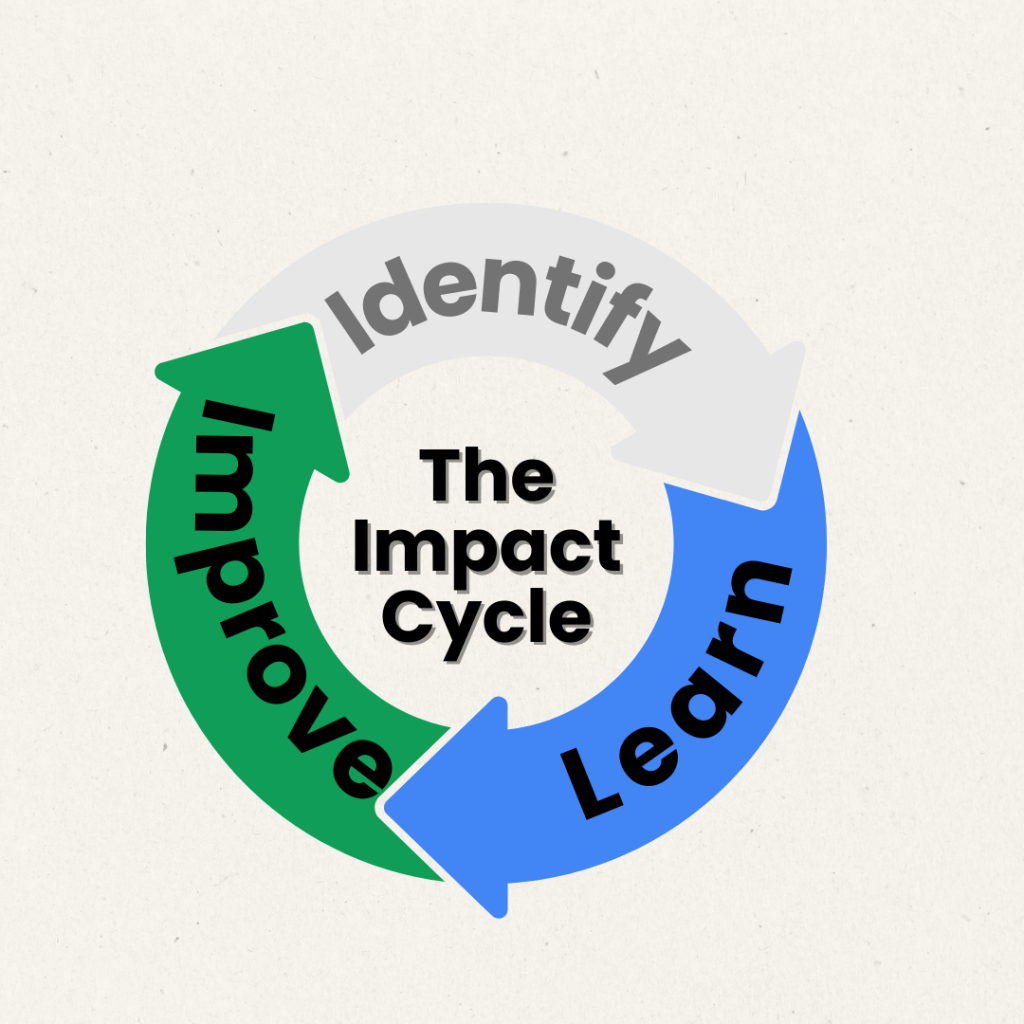
My teaching partner and I have entered the Learn and Improve phases of Jim Knight’s Impact Cycle. After setting clear instructional goals and discussing various options, I provided my teaching partner with checklists to guide them in implementing the strategies we discussed. This post provides an insight into our journey.

Learn Phase: Utilizing Checklists

Checklists are invaluable tools for coaches introducing new teaching practices. They distill complex practices into essential steps, making them easier for teachers to process and implement effectively (Knight, 2018). Their concise format facilitates understanding and ensures consistency in applying instructional strategies. Jim Knight provides a brief explanation of checklists in the video below. Checklists are widely used in other fields like medicine and aviation, where they enhance safety and adherence to protocols (Kumar, 2024). Similarly, in education, checklists support teachers in maintaining focus on instructional goals, helping students to reach those goals.

Note. From The Impact Cycle: Learn Stages – Checklists [Video], by Instructional Coaching Group, 14 May 2024, YouTube (https://www.youtube.com/watch?app=desktop&v=KOFfVO5p3vk)

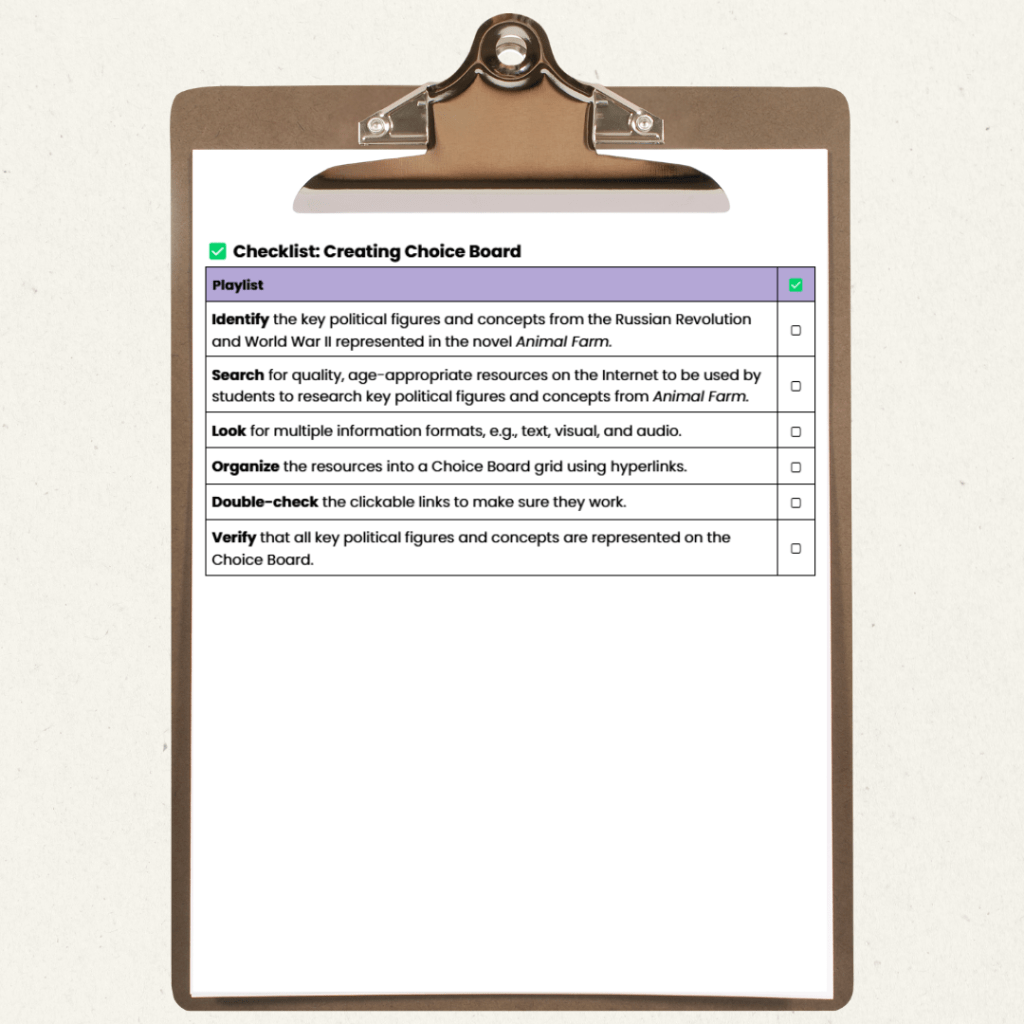
To support my teaching partner, I created a set of checklists to align with our goals and selected learning activities. In previous years, my partner had noted that students often struggled with Animal Farm due to limited background knowledge of the Russian Revolution, World War II, and key political figures of the era, hindering their grasp of the novel’s satirical and allegorical dimensions. To address this, we decided students would create a glossary of key political figures and concepts, with connections to the novel’s characters and events. The teacher would facilitate this by designing a Choice Board of curated resources, providing hyperlinks to age-appropriate, high-quality materials. This glossary would be a “living document,” with frequent check-ins to refine connections as students deepen their understanding of the historical context and its portrayal in the text. This resource will culminate in a reflective essay at the end of the unit.

You can see the checklists I created for my teaching partner by clicking the image to the left. I did a modification of a Learning Map. Initially, I intended to use only the “Checklist: Choice Board/Glossary.” However, after further discussions, my teaching partner and I identified the need for additional checklists focused on designing the Choice Board, daily integration of the Choice Board and glossary, and using the Choice Board as a review tool for the reflective essay. After sharing these checklists, we rehearsed these strategies during our planning period.


Improve Phase: Putting Strategies into Action

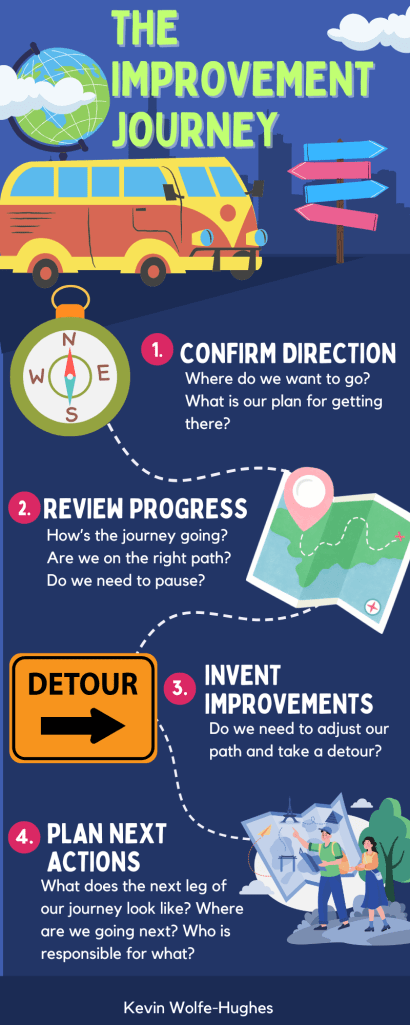
The Improve Phase of Knight’s (2018) Impact Cycle comprises four steps: Confirm Direction, Review Progress, Invent Improvements, and Plan Next Actions. As I read about this phase, I found myself comparing it to a well-planned vacation. Just as one would outline travel plans, destinations, and activities beforehand, the first step, Confirming Direction, requires setting a clear path forward. During the journey, travelers evaluate how well the trip is going, akin to Reviewing Progress. If needed, adjustments are made to enhance the experience, representing the Invent Improvements step. Finally, each leg of the journey concludes with a plan for the next, reflecting Plan Next Actions.

In our Improve Phase, we recognized the need for greater intentionality in having students use their Choice Boards and glossaries to make meaningful connections with their reading. As students progressed, their understanding of historical concepts naturally deepened, paralleling the novel’s character development. Daily check-ins facilitated discussions around the glossary, prompting students to refine their descriptions and recognize the glossary’s practical value in supporting their learning.

Closing Thoughts

I look forward to observing how well students demonstrate their understanding of the satirical and allegorical elements of Animal Farm and how they apply this understanding to current politics in their reflective essays. This coaching experience has been enriching, expanding my knowledge of content beyond my teaching area. The collaboration and reflective practice inherent in the coaching process have been energizing for both my teaching partner and me.


References

Instructional Coaching Group. (2024, May 14). The Impact Cycle: Learn Stage – Checklists [Video]. YouTube. https://www.youtube.com/watch?app=desktop&v=KOFfVO5p3vk

Knight, J. (2018). The impact cycle: What instructional coaches should do to foster powerful improvements in teaching. Corwin, A SAGE Company.


Kumar, P. I. (2024). The checklist protocol. IJVES Case Reports, 2(1), 1–2. https://doi.org/10.4103/ijcr.ijcr_3_24

The Impact Cycle and Coaching

This semester, I am taking a graduate course to learn more about instructional coaching and mentoring. Thinking back to when I started teaching in 1994, I was assigned a mentor teacher with whom I rarely had the chance to meet or interact. This was through no fault of my mentor, as she had no off period to focus on working with me, and our conference periods were at different times of the day. Most of our exchanges occurred during hall duty between classes. While I had a strong understanding of my content area, I could have greatly benefited from having an instructional coach to help me learn effective strategies for reaching my struggling students. Over the years I attended professional development programs and conferences, and I honed my craft and learned strategies to support all of my students. However, having a dedicated instructional coach would have made the process of meeting my students’ needs more timely.

The Impact Cycle

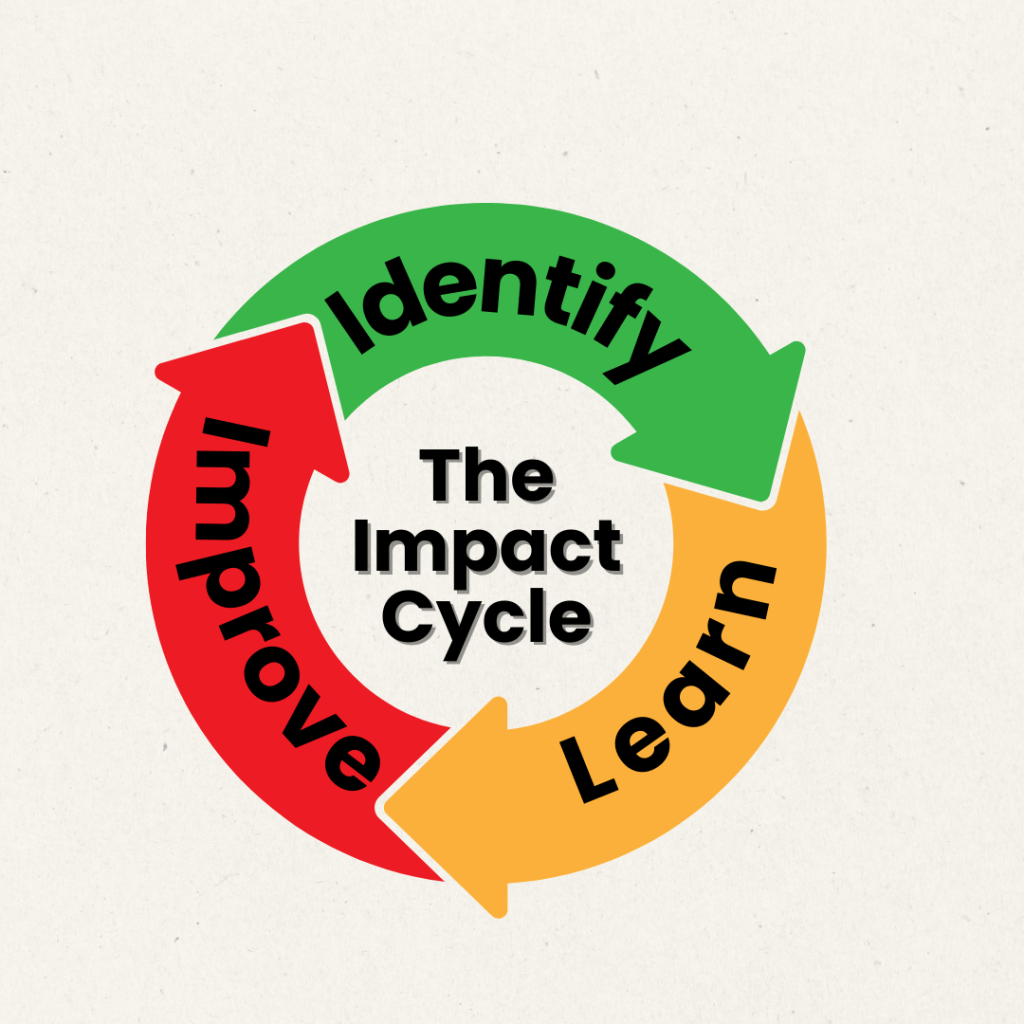
One of the projects I will undertake this semester is engaging in instructional technology coaching with some of the teachers at my school. In preparation for this, I have been learning about the Impact Cycle coaching model. Knight (2018) explains the model as having three parts: Identify, Learn, and Improve.

Note. From Jim Knight’s Impact Cycles Explained [Video], by TheOpenWindow, 14 September 2022, YouTube (https://www.youtube.com/watch?v=8i2hAB6JczA)

During the Identify stage, the instructional technology coach (ITC) and teacher work together to understand the current reality of the classroom. Once a clear picture is established, the ITC collaborates with the teacher to set goals. These goals, as well as all final decisions, are made by the teacher. After setting the goals, the ITC and teacher work together to identify potential strategies that could be employed to meet the goals. The final decision about which strategy to use remains with the teacher. The teacher retains their autonomy at all times and has the final say on all decisions.

Now that a goal and strategy have been decided upon, the process moves into the Learn stage. Here, the ITC provides a clear explanation of the strategy chosen by the teacher and offers opportunities for the teacher to see the strategy in practice. It is crucial for the teacher to both hear and observe the strategy being implemented.

The third stage of the cycle is the Improve stage. At this point, the teacher implements the strategy to reach the goal. Collaboration is key during this stage, as the ITC and teacher monitor progress and make adjustments as needed. These adjustments could involve tweaks to the teaching strategy or trying a new approach, effectively restarting the cycle.

Effective Coaching

Knight (2018) outlines seven Partnership Principles that effective ITCs uphold when partnering with teachers: equality, choice, voice, dialogue, reflection, praxis, and reciprocity. These principles are outlined in the infographic below.
Both the Impact Cycle and the Partnership Principles align with effective practices for instructional technology coaching found in the academic literature. Without a doubt, the most crucial practice when entering into a partnership with a teacher is to tailor support to the teacher’s specific needs and goals (Grierson et al., 2022). This concept ties back to the Identify stage of the Impact Cycle. Additionally, when working with teachers to integrate technology into their classrooms, coaches need to understand the teacher’s initial disposition toward technology integration (Ottenbreit-Leftwich et al., 2022).

Collaborative goal-setting is another critical component that helps teachers articulate their needs to set specific, measurable goals (Grierson et al., 2022). This collaboration serves as the impetus for action, leading to the selection of a strategy to achieve the established goals. Effective ITCs model technology integration and often co-teach with teachers (Grierson et al., 2022; Ottenbreit-Leftwich et al., 2022), aligning with the Learn stage of the Impact Cycle. This co-teaching also exemplifies the principle of praxis by implementing practical applications of technology in the classroom. Iterative reflection is another hallmark of effective ITCs (Grierson et al., 2022). Frequent debriefing to discuss successes and areas for improvement aligns with the Improve stage of the Impact Cycle.

Considering the dispositions of effective ITCs, the most critical factor for successful coaching is the ability to build safe, trusting relationships (Grierson et al., 2022). Without a strong ITC-teacher relationship, it is impossible to create a supportive, collaborative learning environment. Another equally important disposition is the ability to be flexible and responsive (Grierson et al., 2022). The needs of each teacher are unique and vary based on the composition of their classes. Flexibility and responsiveness in adjusting strategies based on dialogue and reflection are crucial to helping teachers achieve their goals.

Looking Ahead

As I learn more about the Impact Cycle for coaching, I am gaining confidence in undertaking the instructional technology coaching process with my teachers. I feel that I have a solid grasp of the Partnership Principles and already incorporate many of them into my interactions with the teachers in my building. I look forward to working with my colleagues and learning from one another as we engage in the coaching process.

References

r2ar. (n.d.). Communication [Icon]. The Noun Project. https://thenounproject.com/browse/icons/term/communication/

Coquet, A. (n.d.). Choice [Icon]. The Noun Project. https://thenounproject.com/browse/icons/term/equality/

Coquet, A. (n.d.). Reciprocity [Icon]. The Noun Project. https://thenounproject.com/browse/icons/term/reciprocity/

Cresnar, G. (n.d.). Thinking [Icon]. The Noun Project. https://thenounproject.com/browse/icons/term/thinking/

Grierson, A. L., Gallagher, T. L., & St Hilaire, R. (2022). Forging the role of the digital technology coach: flexibility, responsiveness, and resourcefulness in supporting teacher professional learning. Professional Development in Education, 50(1), 205–220. https://doi.org/10.1080/19415257.2022.2038657

Knight, J. (2018). The impact cycle: What instructional coaches should do to foster powerful improvements in teaching. Corwin, A SAGE Company.

‌Meiertoberens, L. (n.d.). Equality [Icon]. The Noun Project. https://thenounproject.com/browse/icons/term/equality/

Ottenbreit-Leftwich, A., Liao, Y.-C., Karlin, M., Lu, Y.-H., Ding, A.-C. E., & Guo, M. (2020). Year-long implementation of a research-based technology integration professional development coaching model in an elementary school. Journal of Digital Learning in Teacher Education, 36(4), 206–220. https://doi.org/10.1080/21532974.2020.1804494

Purnomo, E. (n.d.). Action [Icon]. The Noun Project. https://thenounproject.com/browse/icons/term/action/

TheOpenWindow. (2022, September 14). Jim Knight’s Impact Cycles Explained [Video]. YouTube. https://www.youtube.com/watch?v=8i2hAB6JczA

Warhammer. (n.d.). Listening [Icon]. The Noun Project. https://thenounproject.com/browse/icons/term/listening/

Reflecting on Instructional Design

As part of a wrap-up assignment for my ED 601 course on Instructional Technology, I was asked to reflect on the following questions:

  • How would you explain good instructional design to others?
  • What is something that you learned that you didn’t know before?
  • What is at least one thing you will change in your own design for future training sessions?
  • Provide a brief overview of the training you developed for this course (what it is, who it was designed for, highlight components of good instructional design you chose to use, etc.) and provide a link to the site where you hosted all of your information (presentation, handout, etc.).

Good Instructional Design

Brown and Green (2024) describe good instructional design as a reflective process that considers more than the information being presented in a lesson; it also gives equal importance to the learners, the organization of the information, and the presentation of the information. Each of the teachers in my building has different strengths and weaknesses. I have to adjust each training session I offer to tap into those strengths and address those areas of weakness. I also have to organize the information in a way that facilitates processing the information in the allotted training time I have with them each week. Finally, I have to consider that some of the teachers I train are more visual learners while others want to follow written instructions.

Something I Did Not Know Before

Considering the limitations on how the brain can process information and how that ties into how information is presented to learners is something that I had not considered before this course. Specifically, I am thinking of Mayer’s Principles for Multimedia Instruction. One of the principles discusses not adding on-screen text to narrated animation because this requires two different processing channels in the brain (Digital Learning Institute, 2024). This extra effort to process both inputs at the same time can limit how the brain processes the information and connects it to existing schemata. This has become an important consideration as I have been tasked with creating more training materials for my teachers.

One Change

One thing I do not do enough is provide my teachers the opportunity to give me feedback specific to the goals and objectives of each training I do with them. I plan on incorporating more of this into my training this school year. Given that most of my trainings deal with technology, I can assess a teacher’s skill level based on whether they can use an app or piece of technology effectively. Brown and Green (2024) discuss three types of evaluation: learner, formative, and summative. I already incorporate the learner and formative assessments as part of the training I do. It is the summative piece that I would like to focus on more. This type of assessment could provide valuable information that I can relay back to the central office regarding district-mandated programs or technology initiatives and how they are being utilized in the classroom.

My Instructional Design Project

My instructional design focused on training my teachers on the basics of using Chromebooks and how to perform basic troubleshooting. As my district moves to a one-to-one technology environment this school year, all students will now be issued a school Chromebook. Each of the teachers in my are issued a laptop and a Chromebook. Most of the teachers are more comfortable with a laptop and very rarely, if ever, utilize their Chromebooks. Teachers will need to be more comfortable using Chromebooks and troubleshooting common issues to help students.

To fine-tune the training, I incorporated a formative, pre-assessment component to take a temperature check on what each teacher is comfortable doing on the Chromebook. This information will be considered before the training is implemented with my teachers. Understanding the learner’s abilities is a crucial component of instructional design; it informs where I will start with my training and which topics I can simply review and which I need to spend a little more time on during the training.

I also considered how the information will be presented in the training. I incorporated both text and video instructions. In order to minimize the amount of information displayed on a single page, I included links to the videos I created that illustrated the skills outlined in the text on the screen. Teachers have a choice if they want to access and view the videos walking them through the skills. They decide how they want to interact with the information. Initially, I was going to include a GIF of each skill on the same slide as the instructions. I reconsidered this because I felt like it would be too overwhelming. While I still wanted to use the GIF, I ultimately decided it would be better to scrap the GIFs and instead make MP4s of each skill. This way, the learner can pause the video rather than having to wait for the GIF to repeat to see a step again.

Link to Instructional Design Project and Resources

Here is the Google Drive file housing all of the components of the training session I plan to implement with my teachers this September.

References

Brown, A. H., & Green, T. D. (2024). Essentials of instructional design: Connecting fundamental principles with process and practice (5th ed.). Routledge. 

Digital Learning Institute. (2024). Mayer’s 12 principles of multimedia learning. Retrieved July 22, 2024, from https://www.digitallearninginstitute.com/blog/mayers-principles-multimedia-learning 

Looking Forward: Continuity Plans

In my graduate class on distance learning, we examined continuity of instruction. As a starting point for my exploration, I looked at the Continuous Learning Rubric v2.1 (ClassLink et al., n.d.). Three elements from this document resonated with me as an Instructional Tech Specialist: instructional delivery method, professional development, and communication. I chose these three elements because they were areas that I could focus on with our Assistant Principal for Curriculum and Instruction to help support our students, parents, and faculty.

Instructional Delivery Method

An instructional delivery method is described as an outline of the instructional delivery methods for various scenarios (ClassLink et al., n.d.). At my school, I train the teachers on using Schoology, our Learning Management System (LMS). One thing we could do is utilize Schoology to help ensure the continuity of instruction is maintained with respect to teacher absences and school closures. Miami-Dade County Public Schools (2023) have a well-designed plan for teacher absences and school closures. Their plan for teacher absences covers two scenarios: planned and unplanned absences. If an absence is planned in advance, the district has teachers post the lesson on Schoology so that it can be completed asynchronously in class. The substitute teacher directs students to access Schoology and begin work on the lesson.

For unplanned absences, the district has teachers create a folder labeled “Emergency Lesson Plans” in Schoology at the beginning of the school year. The folder is left unpublished for students. Teachers are expected to routinely update the emergency lessons in this folder so the plans remain current with where students are in the course. When a teacher calls in an unplanned absence, the LMS manager accesses the teacher’s Schoology classes and publishes the lesson plan. Again, the substitute teacher would simply direct students to access Schoology and begin work on the lesson.

In the event of school closures, Miami-Dade County Public Schools (2023) follows a similar procedure: Teachers place asynchronous work in Schoology for students to complete. The Miami-Dade policy directs teachers to be flexible with deadlines for work to be completed when there is bad weather, which could affect access to power and Internet service. We have a similar procedure at my school for e-Learning days during emergency school closures. Unfortunately, these are stand-alone lessons that may or may not be related to the content students are currently covering in class. In order to maintain continuity in the course, the lessons should really reflect what the students are currently covering in class.

My school does not use Schoology like Miami-Dade does when teachers are absent. I think it’s important to revise our existing policies to improve how we promote the continuity of learning in our school based on Simonson and Zvacek (2024), who emphasize the importance of revising institutional policies to assess readiness for distance education. Students and parents need opportunities to practice utilizing Schoology to complete online lessons so that they know how to function online. This is important considering how unprepared students, parents, and teachers were to switch to online learning during the pandemic.

Professional Development

If teachers are expected to incorporate opportunities for distance learning within Schoology to maintain the continuity of learning, it is important that they are trained to do so. Teachers need training on the tools the district has chosen for instruction and support for developing the pedagogical skills needed when teaching remotely (ClassLink et al., n.d.). Simonson and Zvacek also stress that “appropriate faculty training is an absolutely imperative readiness concern” (2024, p. 308). While we do provide teachers with ongoing professional learning opportunities for face-to-face classroom instruction, I think it is worthwhile to incorporate best practices in teaching online. Utilizing the embedded planning time in our school schedule, teachers within the same content area can work together to plan online lessons with the same level of academic rigor as face-to-face instruction (Simonson & Zvacek, 2024).

Teachers will likely need the most help ensuring their online materials are accessible. This involves considering the limitations of the LMS and related applications, ensuring software compatibility with assistive devices, and aligning resources with WCAG 2.2 standards (Simonson & Zvacek, 2024). We must ensure that all students, including those with Individualized Education Plans or 504 Plans, can also access and interact with the lessons teachers post online. This will require the expertise of special education teachers in the planning and review process.

Note. From Introduction to web accessibility and W3C standards. [Video], by W3C Web Accessibility Initiative (WAI), 4 December 2017, YouTube (https://youtu.be/20SHvU2PKsM)

Communication

Schools should continuously communicate with all stakeholders about operations, policies, and instruction (ClassLink et al., n.d.). Part of my job at my school is to maintain the school’s website. Currently, we do not have any information on the website about our continuity plan. In researching this topic, I discovered the Miami-Dade County Public Schools Continuity Plan (2024) posted on their website. One of the features I like about their site is that it houses all of the information in one location. Stakeholders can find information regarding the Instructional Continuity Plan, school devices, the district’s LMS, support documents, self-help videos, and contact information for live support. Communication is key in supporting both students and parents to successfully navigate and participate in online learning opportunities (Simonson & Zvacek, 2024).

With my district moving to a 1:1 device model this year, students and parents will need access to information about how to use the school device they will be issued. Providing parents with information on Schoology and how they can create a parent account to support their student’s learning would also be beneficial since middle school is the first time that Schoology is used extensively across all classes. For many parents (and students), I think it would be helpful to offer in-person training on how to get the most out of Schoology. By communicating this information with parents and students, I believe that we can all work together to support our students when they have to participate in online learning.

Closing Thoughts

I’m currently writing this post during the summer. The teachers are enjoying their break, and I’m using this time to prepare for the upcoming 2024-2025 school year. It’s an ideal time to collaborate with my building administrators and start thinking about professional learning opportunities to help our teachers develop the pedagogical skills to develop effective online lessons that can be used with our students. By providing online learning opportunities to our students, they will develop the skills to be successful in their online assignments. This will help to ensure that we are prepared to continue learning no matter what disruptions may occur.

References

ClassLink, American Association of School Administrators, Association of Educational Service Agencies, Consortium for School Networking, & State Educational Technology Directors Association. (n.d.). Continuous learning rubric v2.1. https://docs.google.com/spreadsheets/d/1lXAwsLWBfNslkhIGxHqgojVjmV5n8KIrR7SCmZnNqsA/edit?gid=1000901060#gid=1000901060

Miami-Dade County Public Schools. (2024). M-DCPS instructional continuity plan. Retrieved June 22, 2024, from https://icp.dadeschools.net/#!/fullWidth/7271

Miami-Dade County Public Schools. (2023). Best practices to ensure the continuity of instruction. Innovation and School Choice. Retrieved June 22, 2024, from https://innovationschoolchoice.com/instructional-continuity/

Simonson, M., & Zvacek, S. (2024). Teaching and learning at a distance: Foundations of distance education (8th ed.). Information Age Publishing, Inc.

W3C Web Accessibility Initiative (WAI). (4, December 2017). Introduction to web accessibility and W3C standards [Video]. YouTube. https://youtu.be/20SHvU2PKsM

World Wide Web Consortium. (2024). WCAG 2 overview. W3C Web Accessibility Initiative (WAI). Retrieved June 22, 2024, from https://www.w3.org/WAI/standards-guidelines/wcag/